SMS Program
Weekly Availability Check-Ins
Mapthena sends weekly SMS messages to facility owners and managers who have claimed their listing. These messages ask you to confirm your current bed availability so families searching on Mapthena always see accurate information.
How You Opt In
Claim or receive an invite for your facility
After completing the claim process at mapthena.com/claim, or accepting an invitation sent by a Mapthena representative, you'll create your account and land on a check-in preferences screen.
Choose SMS — it's optional
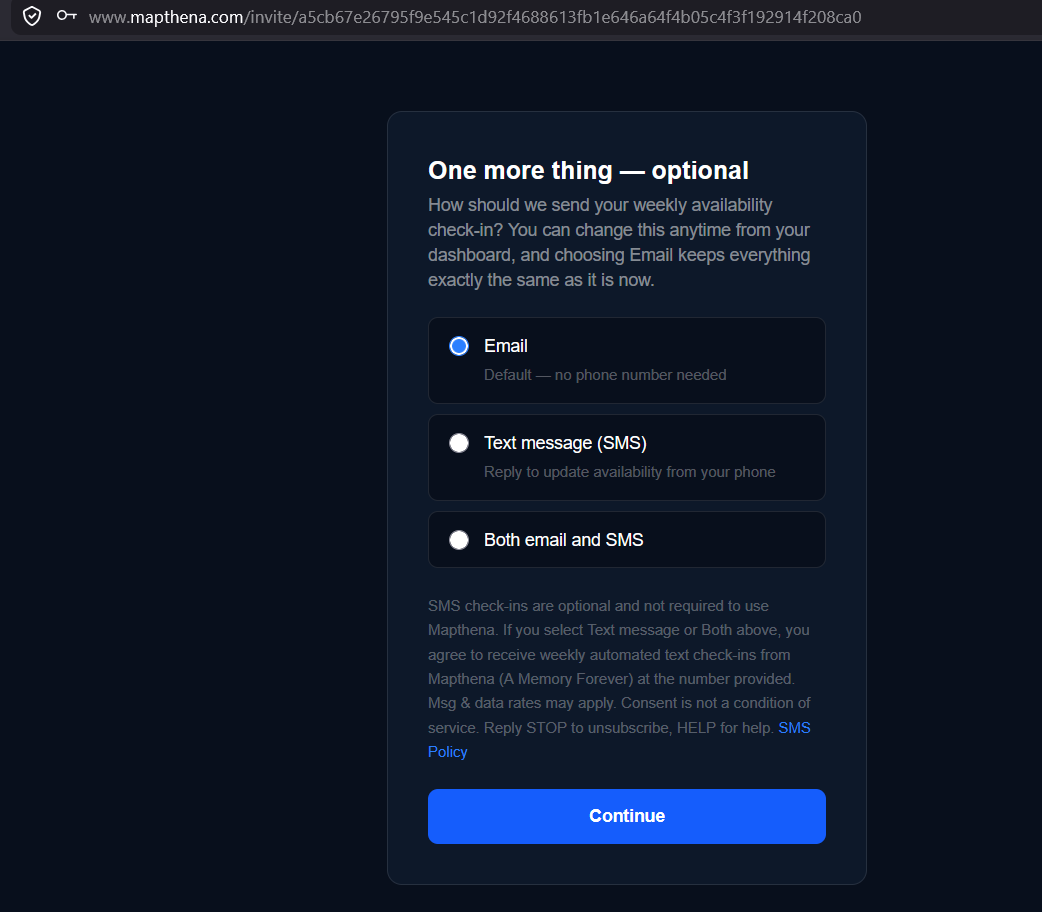
On that screen, you choose how you'd like to receive weekly check-ins: Email, SMS, or both. Email is the default. Selecting SMS or Both reveals a phone number field and the consent language shown below — nothing about claiming your listing requires SMS.
Receive your first check-in
Each Monday, you'll receive a brief SMS asking you to update your bed availability. Simply reply to the message — no login required.
See It In Action
This is the check-in preferences screen every facility owner sees right after creating their account. SMS is never required — Email is selected by default, and choosing SMS or Both is what triggers the consent language and phone number field shown here.
Program Details
- Message frequency
- Approximately 1 message per week (Mondays)
- Message type
- Transactional — availability update requests only
- Who receives messages
- Facility owners and managers who have claimed their listing on Mapthena
- Sender
- Mapthena (mapthena.com), operated by A Memory Forever, a 501(c)(3) nonprofit
- Standard rates
- Message and data rates may apply depending on your carrier plan
How to Opt Out
You can stop receiving SMS messages at any time by replying STOP to any message from Mapthena. You will receive a confirmation that your number has been unsubscribed and no further messages will be sent.
To re-subscribe, reply START to a Mapthena number, or contact us at remember@amemoryforever.org.
Need Help?
Reply HELP to any Mapthena message for assistance, or reach us directly at remember@amemoryforever.org.